显示标签为“NEXIQ-2 USB Link”的博文。显示所有博文

2021年10月26日星期二

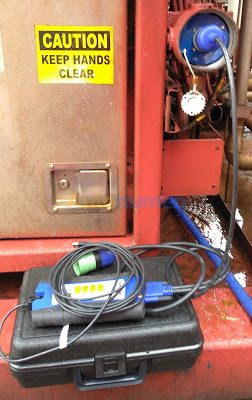
How to get Nexiq USB Link to work with Cat ET software


I’m here to help you guys confirm that:

The Nexiq adapter is able to work perfectly with Caterpillar Electronic Technician software.

Nexiq has no problems working with Cat ET. If the Cat is in a GM truck, you will need a special Cat OBDII connector. In trucks with the standard 6/9 pin connector, there is no issues.

Works on BHL F-series , Whl excav. and wheel loaders, but better option is Cat ET

Nexiq adapters work with Cat ET on truck engines.

NOT work on construction equipment due to a different communication protocol. Will need a Cat Comm 3 for those.

Btw, spend the money on a real Nexiq or good china clone if you do….stay away from the cheap china knockoffs. They work, kinda, but for how long and no support.

This is a working china clone Nexiq adapter at a good price

Here are Nexiq USB Link adapter and CAT ET connection issues and solutions, which might help you out.

– Connection Error 434:

The reason for error 434 might be the adapterserver in the Cat software, change it for the chinese Cat server and it will work, at least here it does after the 434 error, C:\Program Files (x86)\Common Files\Offboard Information Products, look here for “”CommunicationAdapterServer.exe”and “CommunicationAdapterServerps.dll” by me dll file was not there but I put it anyway, I copied it from a other XP computer who was working with the chinees cat adapter, however I put it in a WIN 7 computer, that was working too after the change, I m new here have no idea how to share the files, but I have them here, save the original files in a new folder, never know if you ever get a original one (-: , hope that I could help you with this info

– Connection Error 149:

Utilities -> Preferences -> Communications -> RP1210 Compilant Device then Advanced Choose USB Nexiq Link

If it doesn’t work,

Reinstall drivers and verify that you have this in the device manager

JUNGO USB LINK WINDRIVER if you missing one of this it wont work

OR

You need to run this program in compatibility mode for windows xp, sp 3 to get the nexiq to work on windows 7. i was getting the same notice that my nexiq was not a rp1210 compliant device, i went to programs and selected cat (etech), right clicked, properties, compatibility, and chose windows xp sp3. went back to cat, and the device works perfectly now. That will fix this issue

– Cannot connect to any truck after Nexiq firmware update:

No need to be updated because the result would be the same it will not work, simply reformat the laptop or use an additional USB adapter.It has been my tried and succeeded.You simply reinstall firmware v1.0

remember where the first time you connect the USB port, meaning the usb port 1, port2 on the laptop.You can also look in computer management \ device manager \ Jungo \ there should be a USB device \ windriver.Good luck.

If you are using WIN XP. / WIN 7/8 you have to reinstall the PC / notebook / formate driver C / REMEMBER Coppy your data if only one partition.After you install all the software and nexiq drives, usb vincle nexiq connect to a PC / notebook to install the new one.If you find welcom to the found new hardware wizard or click cancel driver updates.Open Computer Management \ Device Manager \ Jungo \ if there is a usb device that is an exclamation point, click disable usb device And off usb nexiq of the computer after the reinstall usb nexiq to the computer and then click enable usb device and then restart your computer and unplug the usb nexiq back of the computer.Do the same on the other port.Good luck.

Connect to a computer usb nexiq vehicle.CAUTION cancle welcome to the new hardware found.go to Control panel \ administrative tools \ computer management \ device manager \ Jungo – usb device — click disable – unplug usb nexiq vehicle from computer.Then connect back to the computer usb vehicle nexiq — click enable usb devices – usb nexiq vehicle back off of the computer — restart the computer .
How to get Nexiq USB Link to work with Cat ET software-1

2021年10月19日星期二

Test the Connection to the Vehicle using NEXIQ Device Tester


Test the Connection to the Vehicle
Test the Connection to the Vehicle using NEXIQ Device Tester-1

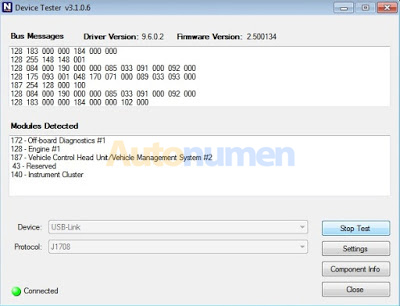
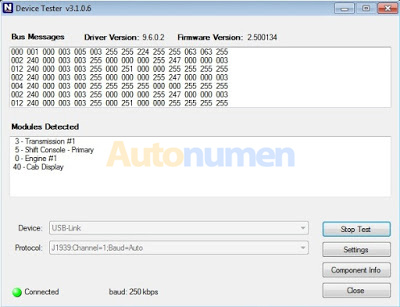
Use the Device Tester to test the connection between the USB-Link and the vehicle. At startup, the Device Tester checks for any NEXIQ drivers installed on the PC.
-Download NEXIQ Product Driver here: NEXIQ Driver

Access the Device Tester from the Windows task-bar
1. Prepare your PC, and connect Heavy Duty Truck Scanner NEXIQ device to Diagnostic Port/Connector on unit.
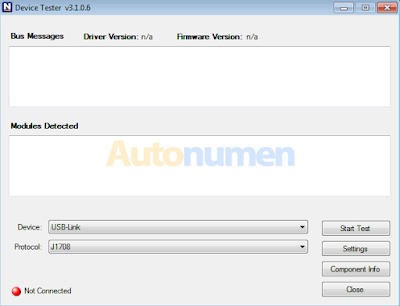
2. Click Start and then select All Programs – NEXIQ – Device Tester, or through shortcut “Device Tester” on desktop.
Test the Connection to the Vehicle using NEXIQ Device Tester-2

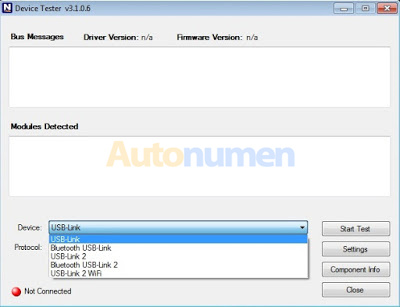
3. Use the drop-down button in the “Device” box to select the appropriate device (for example: USB-Link). The Device box lists all the devices supported by the NEXIQ drivers installed on the PC.
Test the Connection to the Vehicle using NEXIQ Device Tester-3

4. Use the drop-down button in the “Protocol” box to select the appropriate protocol (for example: J1708). The Protocol box lists only the protocols supported by the device selected in the “Device” box.
Test the Connection to the Vehicle using NEXIQ Device Tester-4

5. Press the “Start Test” button.
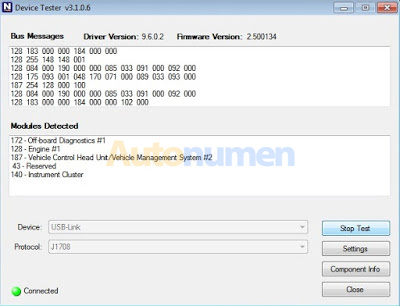
6. The “Device Tester” screen is refreshed, and data received from the vehicle bus is displayed in the “Bus Messages” window.
Test the Connection to the Vehicle using NEXIQ Device Tester-5
Test the Connection to the Vehicle using NEXIQ Device Tester-6

NOTE: The window in the lower portion of the screen displays a list of all systems seen on the bus. It is used for J1708 and J1939 only. For all other protocols this window will be unavailable (i.e., NOT USED). For J1708, the window title reads MIDs Seen. For J1939, the window title reads Source Addresses Seen.

Preparing to Use the USB-Link
7. If the Connection Indicator button is red (i.e., Not Connected), do one of the following:
—For wireless connection using Bluetooth technology:
? In the Device list, make sure that the heading is BT USB-Link (Protocol desired).
? Check to ensure that the connections between the USB-Link and the vehicle are secure (i.e., the Diagnostic Connector).
? Check to make certain that the Power LED on the USB-Link is illuminated.
? Check to make sure you are “paired” with devices.

—For wired connection using a USB cable:
? In the Device list, make sure that the heading is USB-Link (Protocol desired).
? Check to ensure that the connections between the USB-Link and PC are secure (i.e., the USB cable).
? Check the connections between the USB-Link and the vehicle (i.e., the Diagnostic Connector).
? Check to make certain that the Power LED on the USB-Link is illuminated.

8. Click “Stop Test” to end the test, or select another device to test.

2021年7月20日星期二

NEXIQ USB Link2 diesel diagnostic interface

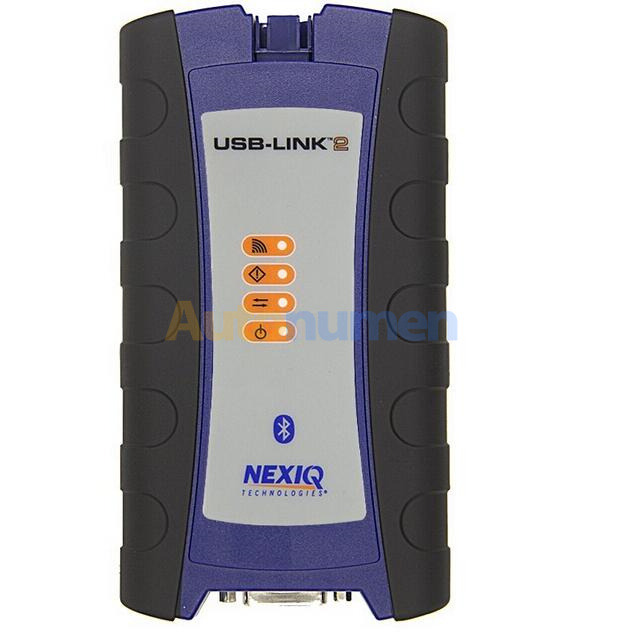
 NEXIQ Technologies' next-generation in-vehicle interface USB-Link 2 has arrived. The new USB-Link ™ 2 is reliable and robust, and is five times faster than its predecessor. It has 16 times more RAM than the old USB-Link, and supports heavier bus loads on simultaneous channels.


Interfase de diagnostico para diésel USB Link2 de NEXIQ


2021年6月29日星期二

Includes Nexiq USB Link 2 Companion Guide


We consider ourselves the authority on the Nexiq USB Link 2, and this guide proves it. Created by us, we are now including it with the USB Link 2’s for a fraction of the price. This guide is a 30+ page power-packed PDF that will give you information such as:

Step-by-step instruction with clear, concise pictures on how to set the proper adapter for each diesel program. This includes 19 different programs such as Cummins Insite, CAT ET, Premium Tech Tool, Eaton Service Ranger, Detroit Diesel Diagnostic Link, and many, many more!
The most common problem people have with a Nexiq USB Link 2 is that it won’t connect to the truck. But how do you figure out if its the adapter, the truck, the computer, or the cable? Well, we have created a simple 6-step process to help you figure it out! This guide gives pictures for every single step! We also include a custom flow-chart that you can print out and keep with your USB Link!
Clean up that pesky adapter list! Yes, you don’t need to have 20+ different adapters listed & installed on your laptop if you only have 1. We show you how to delete and clean them out!
We provide a complete list of accessories, with direct link to purchase, for all types of accessories for your USB Link. This includes extra cables, replacement cables, and protective gear to keep your USB Link running smooth!

PC-to-vehicle interface compatible with multiple software applications, minimizing your investment in multiple brand-specific diagnostic interfaces.

Class 1 Bluetooth provides up to 100 feet of wireless freedom
Flexible configuration supports wired or wireless connectivity
Compatible with applications that diagnose engines, transmissions, ABS, instrument panels and more
Reduce reprogramming times with direct USB connection
Mixed fleet capabilities with broad protocol support
Quick access to vehicle data for maintenance or management reports
Quickly attaches to vehicle’s diagnostic connector
No messy cables to untangle or get in the way with Bluetooth
Easy portability increases flexibility
May be used with desktop PC or laptop

FEATURES:

RP1210A, RP1210B, RP1210C and J2534 API support
Bluetooth vehicle-to-PC wireless connectivity
USB vehicle-to-PC connectivity
Protocol coverage for automotive to heavy duty vehicles:
3 CAN – J1939/CAN125/CAN250/CAN500/CAN1000
Automatic bit rate detection for all standard CAN channels
Single Wire CAN
Fault Tolerant CAN
J1587/J1708
J1850
ISO 15765 (Diagnostic CAN)
ISO 14230 (KWP2000 over ISO9141)
J2534
ALDL
ATEC 160 (160 baud)
Supports Windows® XP, Windows® 7 32- and 64-bit versions, and Windows® 8 32- and 64-bit versions

2019年3月12日星期二

(Buying Guide)Nexiq USB Link 1 or 2? WiFi or Bluetooth?

Nexiq 1 or Nexiq 2?
Nexiq 1 is discontinued. no more updates but for most people it will still work just fine.
Nexiq 2 is the current model and has more future potential than what the nexiq 1 could do.
Cables for each are different so they are not interchangeable. When ordering, you should make sure you get 3 different cables. The standard 6/9 pin y-cable with the green connector on the 9 pin plug so you can communicate to the newer 500k baud network. A standard OBD II cable and an OBD II Cat cable to talk to Caterpillar engines in GM trucks. If you need to communicate to trailer ABS, you will also need a PLC adapter.
Do NOT buy the inexpensive clones that normally come with multiple cables. The clones are not reliable and if they update with nexiq software, they will become a brick.
The nexiq 2 clones don’t have 26 pin cables just the standard fitting also the usb connector is different and there is a hole by the usb connector on the clones as well.
Nexiq wifi or bluetooth?
Both will work off bluetooth but I find bluetooth very slow. It’s faster and easier just to use a cable to connect to the laptop. The cable is a standard USB “printer” cable. I like using a 5 meter cable so I can move the laptop out of the truck is I have to. There are times I’ve used the laptop on the other side of the truck and even under the truck. The long cable makes it easier. Occasionally, I’ll use bluetooth.
I have no idea what the wifi option is. To me, that would mean if the nexiq is communicating to the laptop over wifi then the laptop’s network connection isn’t connected to a router. Just ignore any wifi options.
Nexiq 1 or 2? wifi or bluetooth?
I’ve been able to talk to everything I need to with my Nexiq 1. It all depends on what software you’re using and what type of cable connections you have but they all will work with a nexiq. With the right software and an OBDII cable, I can even communicate to automotive. I used the OBDII cable yesterday to talk to a Hino.
There are a lot of other types of datalinks you can use and they will all work fine. Nexiq has sort of become the standard that all the software will work with plus you can get some add ons to make it better. The nexiq 1 didn’t originally come with a cable lock and the USB cable could break the connector on the motherboard if it was hit, bent etc from normal usage. I think they all come with the cable lock now which prevents the connector from being damaged. Mine also has a rubber protective boot that keeps it from getting damaged while being bumped and banged around from normal use.
There are a few vehicles that the nexiq just won’t talk to. Things like Mitsubishi (GM city delivery trucks etc) require a propriety datalink and there are a few others like that also. Espar heaters comes to mind. You need special hardware to communicate with them and it’s never inexpensive.
I just went to the nexiq site and downloaded the nexiq 2 wifi manual to see what it says. There are 2 options for wifi. peer to peer where the nexiq is connected directly to the laptop which means a second wifi card is required for the laptop if you want to stay connected to the companies network or you can allow the nexiq 2 to connect to the companies wifi network and your laptop connects to the nexiq through that network.
I find network communication to be sketchy at times. The position of the router in our shop gives poor wifi outside the shop so if you’re out of wifi range, you need to switch to a peer to peer connection. Personally, just go with the bluetooth version if you really need to do a wireless connection. 99.999% of the time, I connect through a USB cable because it connects quicker and the connection speed is much faster. If you ever need to do reprogramming, cable connection is highly recommended.
Wifi may have a much longer range but bluetooth will normally have around a 20-30 foot range. If your laptop is 20-30 feet away from the vehicle you are connected to, that’s a lot of walking to go back and forth from the truck to the laptop. A simple USB cable works much better.
I also noticed that the Nexiq 2 uses a different USB cable than what the Nexiq 1 uses. I guess the simplest way to describe it is the Nexiq 1 uses a USB printer cable end and the Nexiq 2 uses a digital camera end. I can’t remember the technical names from each end but they’re all easy to find cables if you need them in different lengths.
In conclusion, you’ll get what you pay for. Be careful to buy a Nexiq clone off! You may have issues with all the lights blink and they can not connect any more, you can not get warranty on Chinese clones so you are out of luck.If you still want to have a cheap clone one, autonumen.com is the the only supplier i recommend; he’s a man of his word to trust in. It begins as autonumen.com and turns to be autonumen.com. I’ve known this site for 7 years around, items from him are used with relief be’coz of professional tech support there. For others, I don’t support them and Nexiq won’t warranty them. Anyway, good luck.

2019年3月4日星期一

Cummins Inline 7 vs Nexiq USB Link 2

I am going to by by adapter for Cummins but I am confused between Inline 7 and NEXIQ USB Link 2…..
please any advice and what is the difference between both of them.
Thanks
Advice.. here you go
Mikeservice:
Nothing different other than inline comes with inline harness to plug into any Cummins harness if you can’t talk through oem side
Undeadmechanic:
Inline 7 is built by NEXIQ USB Link for Cummins. They slap their sticker on it, and give you the extra harness to plug into the backbone directly.
I ordered an inline 6 to get the extra goodies for benching and they sent a 7 instead. I’m not complaining, lol. I haven’t installed it yet, but it may have a different firmware than the “real” usb link 2. I’ll find out when I get around to installing it since I now have one of each.
silnoreki :
Inline have both blutooth and wifi and slighty faster even when looks same.Im happy with my inline7,just 2 cents.
Sdtruck12:
i can use inline 7 for everything from ddct to jpro and n14. from autonumen to new works great for programming real fast. Sometimes cummins only like cummins adapters, like n14 m11 570 stuff like that in my experience at least
harobaua:
The two differences I have noticed are:
1. Inline 7 has wifi and bluetooth at the time, nexiq only one at a time.
2. Nexiq 2 has more protocols than Inline 7, for example the Inline 7 does not work with Hino, Toyota, Isuzu.